patternsearch
R2026bFind minimum of function using pattern search
Syntax
Description
x = patternsearch(fun,x0)x, to the function handle fun that
computes the values of the objective function. x0 is
a real vector specifying an initial point for the pattern search algorithm.
Note
Passing Extra Parameters explains how to pass extra parameters to the objective function and nonlinear constraint functions, if necessary.
x = patternsearch(fun,x0,A,b,Aeq,beq,lb,ub)x,
so that the solution is always in the range lb ≤ x ≤ ub.
If no linear equalities exist, set Aeq = [] and beq
= []. If x(i) has no lower bound, set lb(i)
= -Inf. If x(i) has no upper bound, set ub(i)
= Inf.
x = patternsearch(fun,x0,A,b,Aeq,beq,lb,ub,nonlcon)nonlcon. The
function nonlcon accepts x and returns vectors
ineqnonlin and eqnonlin, representing the
nonlinear inequalities and equalities respectively. patternsearch
optimizes fun such that
ineqnonlin(x) ≤ 0 and
eqnonlin(x) = 0. If no bounds exist, set lb =
[], ub = [], or both.
Examples
Minimize an unconstrained problem using the patternsearch solver.
Objective Function
The objective function psobj is a two-variable function.
function y = psobj(x)

y = exp(-x(1)^2-x(2)^2)*(1+5*x(1) + 6*x(2) + 12*x(1)*cos(x(2)));
end
Set the objective function to @psobj.
fun = @psobj;
Find the minimum, starting at the point [0,0].
x0 = [0,0];
x = patternsearch(fun,x0)
patternsearch stopped because the mesh size was less than options.MeshTolerance.
x = 1×2

   -0.7037   -0.1860
Minimize a function subject to some linear inequality constraints.
Objective Function
The objective function psobj is a two-variable function.
function y = psobj(x)

y = exp(-x(1)^2-x(2)^2)*(1+5*x(1) + 6*x(2) + 12*x(1)*cos(x(2)));
end
Set the objective function to @psobj.
fun = @psobj;
Set the two linear inequality constraints.
A = [-3,-2;
    -4,-7];
b = [-1;-8];
Find the minimum, starting at the point [0.5,-0.5].
x0 = [0.5,-0.5];
x = patternsearch(fun,x0,A,b)
patternsearch stopped because the mesh size was less than options.MeshTolerance.
x = 1×2

    5.2827   -1.8758
Find the minimum of a function that has only bound constraints.
Objective Function
The objective function psobj is a two-variable function.
function y = psobj(x)

y = exp(-x(1)^2-x(2)^2)*(1+5*x(1) + 6*x(2) + 12*x(1)*cos(x(2)));
end
Set the objective function to @psobj.
fun = @psobj;
Constrain the solution to satisfy and .
lb = [0,-Inf];
ub = [Inf,-3];
A = [];
b = [];
Aeq = [];
beq = [];
Find the minimum, starting at the point [1,-5].
x0 = [1,-5];
x = patternsearch(fun,x0,A,b,Aeq,beq,lb,ub)
patternsearch stopped because the mesh size was less than options.MeshTolerance.
x = 1×2

    0.1880   -3.0000
Find the minimum of a function subject to a nonlinear inequality constraint.
Create the following two-variable objective function.
function y = psobj(x)
y = exp(-x(1)^2-x(2)^2)*(1+5*x(1) + 6*x(2) + 12*x(1)*cos(x(2)));
end
Set the objective function to @psobj.
fun = @psobj;
Create the nonlinear constraint
function [ineqnonlin,eqnonlin] = ellipsetilt(x)
eqnonlin = [];
ineqnonlin = x(1)*x(2)/2 + (x(1)+2)^2 + (x(2)-2)^2/2 - 2;
end
Start patternsearch from the initial point [-2,-2].
x0 = [-2,-2];
A = [];
b = [];
Aeq = [];
beq = [];
lb = [];
ub = [];
nonlcon = @ellipsetilt;
x = patternsearch(fun,x0,A,b,Aeq,beq,lb,ub,nonlcon)
Optimization finished: mesh size less than options.MeshTolerance
and constraint violation is less than options.ConstraintTolerance.
x = 1×2

   -1.5144    0.0875
Sometimes the different patternsearch algorithms have noticeably different behavior. While it can be difficult to predict which algorithm works best for a problem, you can easily try different algorithms. For this example, use the sawtoothxy objective function, which is described and plotted in Find Global or Multiple Local Minima.
function f = sawtoothxy(x,y)
[t,r] = cart2pol(x,y); % change to polar coordinates
h = cos(2*t - 1/2)/2 + cos(t) + 2;
g = (sin(r) - sin(2*r)/2 + sin(3*r)/3 - sin(4*r)/4 + 4) ...
    .*r.^2./(r+1);
f = g.*h;
end
To see the behavior of the different algorithms when minimizing this objective function, set some asymmetric bounds. Also set an initial point x0 that is far from the true solution sol = [0 0], where sawtoothxy(0,0) = 0.
rng default
x0 = 12*randn(1,2);
lb = [-15,-26];
ub = [26,15];
fun = @(x)sawtoothxy(x(1),x(2));
Minimize the sawtoothxy function using the "classic" patternsearch algorithm.
optsc = optimoptions("patternsearch",Algorithm="classic");
[sol,fval,eflag,output] = patternsearch(fun,...
    x0,[],[],[],[],lb,ub,[],optsc)
patternsearch stopped because the mesh size was less than options.MeshTolerance.
sol = 1×2
10-5 ×

    0.9825         0
fval =
1.3278e-09
eflag =
1
output = struct with fields:
         function: @(x)sawtoothxy(x(1),x(2))
      problemtype: 'boundconstraints'
       pollmethod: 'gpspositivebasis2n'
    maxconstraint: 0
     searchmethod: []
       iterations: 52
        funccount: 168
         meshsize: 9.5367e-07
         rngstate: [1×1 struct]
          message: 'patternsearch stopped because the mesh size was less than options.MeshTolerance.'
The "classic" algorithm reaches the global solution in 52 iterations and 168 function evaluations.
Try the "nups" algorithm.
rng default % For reproducibility
optsn = optimoptions("patternsearch",Algorithm="nups");
[sol,fval,eflag,output] = patternsearch(fun,...
    x0,[],[],[],[],lb,ub,[],optsn)
patternsearch stopped because the mesh size was less than options.MeshTolerance.
sol = 1×2

    6.3204   15.0000
fval =
85.9256
eflag =
1
output = struct with fields:
         function: @(x)sawtoothxy(x(1),x(2))
      problemtype: 'boundconstraints'
       pollmethod: 'nups'
    maxconstraint: 0
     searchmethod: []
       iterations: 29
        funccount: 88
         meshsize: 7.1526e-07
         rngstate: [1×1 struct]
          message: 'patternsearch stopped because the mesh size was less than options.MeshTolerance.'
This time the solver reaches a local solution in just 29 iterations and 88 function evaluations, but the solution is not the global solution.
Try using the "nups-mads" algorithm, which takes no steps in the coordinate directions.
rng default % For reproducibility
optsm = optimoptions("patternsearch",Algorithm="nups-mads");
[sol,fval,eflag,output] = patternsearch(fun,...
    x0,[],[],[],[],lb,ub,[],optsm)
patternsearch stopped because the mesh size was less than options.MeshTolerance.
sol = 1×2
10-4 ×

   -0.5275    0.0806
fval =
1.5477e-08
eflag =
1
output = struct with fields:
         function: @(x)sawtoothxy(x(1),x(2))
      problemtype: 'boundconstraints'
       pollmethod: 'nups-mads'
    maxconstraint: 0
     searchmethod: []
       iterations: 55
        funccount: 189
         meshsize: 9.5367e-07
         rngstate: [1×1 struct]
          message: 'patternsearch stopped because the mesh size was less than options.MeshTolerance.'
This time, the solver reaches the global solution in 55 iterations and 189 function evaluations, which is similar to the "classic" algorithm.
Create the following two-variable objective function.
function y = psobj(x)
y = exp(-x(1)^2-x(2)^2)*(1+5*x(1) + 6*x(2) + 12*x(1)*cos(x(2)));
end
Set the objective function to @psobj.
fun = @psobj;
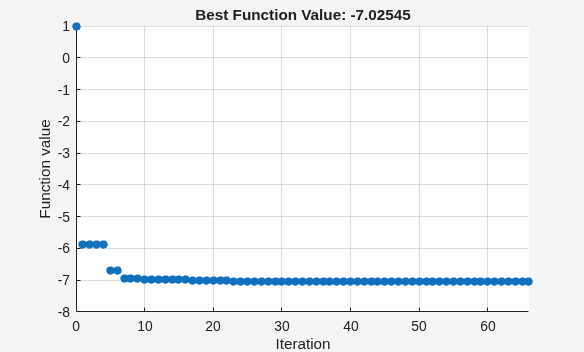
Set options to give iterative display and to plot the objective function at each iteration.
options = optimoptions("patternsearch",...
    Display="iter",...
    PlotFcn=@psplotbestf);
Find the unconstrained minimum of the objective starting from the point [0,0].
x0 = [0,0];
A = [];
b = [];
Aeq = [];
beq = [];
lb = [];
ub = [];
nonlcon = [];
x = patternsearch(fun,x0,A,b,Aeq,beq,lb,ub,nonlcon,options)
Iter     Func-count       f(x)      MeshSize     Method
    0           1              1             1
    1           4       -5.88607             2     Successful Poll
    2           8       -5.88607             1     Refine Mesh
    3          12       -5.88607           0.5     Refine Mesh
    4          16       -5.88607          0.25     Refine Mesh
    5          17       -6.69495           0.5     Successful Poll
    6          21       -6.69495          0.25     Refine Mesh
    7          25       -6.94245           0.5     Successful Poll
    8          29       -6.94245          0.25     Refine Mesh
    9          33       -6.94245         0.125     Refine Mesh
   10          35       -6.97247          0.25     Successful Poll
   11          39       -6.97247         0.125     Refine Mesh
   12          43       -6.97247        0.0625     Refine Mesh
   13          44       -6.97947         0.125     Successful Poll
   14          48       -6.98654          0.25     Successful Poll
   15          52       -6.98654         0.125     Refine Mesh
   16          56       -6.98654        0.0625     Refine Mesh
   17          58       -7.02187         0.125     Successful Poll
   18          62       -7.02187        0.0625     Refine Mesh
   19          66       -7.02187       0.03125     Refine Mesh
   20          69       -7.02215        0.0625     Successful Poll
   21          73       -7.02215       0.03125     Refine Mesh
   22          77       -7.02215       0.01562     Refine Mesh
   23          78       -7.02542       0.03125     Successful Poll
   24          82       -7.02542       0.01562     Refine Mesh
   25          86       -7.02542      0.007812     Refine Mesh
   26          90       -7.02542      0.003906     Refine Mesh
   27          94       -7.02542      0.001953     Refine Mesh
   28          96       -7.02544      0.003906     Successful Poll
   29         100       -7.02544      0.001953     Refine Mesh
   30         104       -7.02544     0.0009766     Refine Mesh

Iter     Func-count        f(x)       MeshSize      Method
   31         107       -7.02544      0.001953     Successful Poll
   32         111       -7.02544     0.0009766     Refine Mesh
   33         115       -7.02544     0.0004883     Refine Mesh
   34         116       -7.02545     0.0009766     Successful Poll
   35         120       -7.02545     0.0004883     Refine Mesh
   36         124       -7.02545     0.0009766     Successful Poll
   37         128       -7.02545     0.0004883     Refine Mesh
   38         132       -7.02545     0.0002441     Refine Mesh
   39         136       -7.02545     0.0001221     Refine Mesh
   40         140       -7.02545     6.104e-05     Refine Mesh
   41         142       -7.02545     0.0001221     Successful Poll
   42         146       -7.02545     6.104e-05     Refine Mesh
   43         149       -7.02545     0.0001221     Successful Poll
   44         153       -7.02545     6.104e-05     Refine Mesh
   45         157       -7.02545     3.052e-05     Refine Mesh
   46         161       -7.02545     1.526e-05     Refine Mesh
   47         162       -7.02545     3.052e-05     Successful Poll
   48         166       -7.02545     1.526e-05     Refine Mesh
   49         170       -7.02545     3.052e-05     Successful Poll
   50         174       -7.02545     1.526e-05     Refine Mesh
   51         178       -7.02545     7.629e-06     Refine Mesh
   52         181       -7.02545     1.526e-05     Successful Poll
   53         185       -7.02545     7.629e-06     Refine Mesh
   54         187       -7.02545     1.526e-05     Successful Poll
   55         191       -7.02545     7.629e-06     Refine Mesh
   56         195       -7.02545     3.815e-06     Refine Mesh
   57         196       -7.02545     7.629e-06     Successful Poll
   58         200       -7.02545     1.526e-05     Successful Poll
   59         204       -7.02545     7.629e-06     Refine Mesh
   60         208       -7.02545     3.815e-06     Refine Mesh

Iter     Func-count        f(x)       MeshSize      Method
   61         210       -7.02545     7.629e-06     Successful Poll
   62         214       -7.02545     3.815e-06     Refine Mesh
   63         218       -7.02545     1.907e-06     Refine Mesh
   64         221       -7.02545     3.815e-06     Successful Poll
   65         225       -7.02545     1.907e-06     Refine Mesh
   66         229       -7.02545     9.537e-07     Refine Mesh
patternsearch stopped because the mesh size was less than options.MeshTolerance.
x = 1×2

   -0.7037   -0.1860
Find a minimum value of a function and report both the location and value of the minimum.
Objective Function
The objective function psobj is a two-variable function.
function y = psobj(x)

y = exp(-x(1)^2-x(2)^2)*(1+5*x(1) + 6*x(2) + 12*x(1)*cos(x(2)));
end
Set the objective function to @psobj.
fun = @psobj;
Find the unconstrained minimum of the objective, starting from the point [0,0]. Return both the location of the minimum, x, and the value of fun(x).
x0 = [0,0];
[x,fval] = patternsearch(fun,x0)
patternsearch stopped because the mesh size was less than options.MeshTolerance.
x = 1×2

   -0.7037   -0.1860
fval =
-7.0254
To examine the patternsearch solution process, obtain all outputs.
Objective Function
The objective function psobj is a two-variable function.
function y = psobj(x)

y = exp(-x(1)^2-x(2)^2)*(1+5*x(1) + 6*x(2) + 12*x(1)*cos(x(2)));
end
Set the objective function to @psobj.
fun = @psobj;
Find the unconstrained minimum of the objective, starting from the point [0,0]. Return the solution, x, the objective function value at the solution, fun(x), the exit flag, and the output structure.
x0 = [0,0];
[x,fval,exitflag,output] = patternsearch(fun,x0)
patternsearch stopped because the mesh size was less than options.MeshTolerance.
x = 1×2

   -0.7037   -0.1860
fval =
-7.0254
exitflag =
1
output = struct with fields:
         function: @psobj
      problemtype: 'unconstrained'
       pollmethod: 'gpspositivebasis2n'
    maxconstraint: []
     searchmethod: []
       iterations: 66
        funccount: 229
         meshsize: 9.5367e-07
         rngstate: [1×1 struct]
          message: 'patternsearch stopped because the mesh size was less than options.MeshTolerance.'
The exitflag is 1, indicating convergence to a local minimum.
The output structure includes information such as how many iterations patternsearch took, and how many function evaluations. Compare this output structure with the results from Pattern Search with Nondefault Options. In that example, you obtain some of this information, but did not obtain, for example, the number of function evaluations.
Input Arguments
Output Arguments
Algorithms
By default and in the absence of linear constraints, patternsearch looks
for a minimum based on an adaptive mesh that is aligned with the coordinate directions. See
What Is Direct Search? and How Pattern Search Polling Works.
When you set the Algorithm option to "nups" or one
of its variants, patternsearch uses the algorithm described in Nonuniform Pattern Search (NUPS) Algorithm. This algorithm is different
from the default algorithm in several ways; for example, it has fewer options to
set.
Alternative Functionality
App
The Optimize Live Editor task provides a visual interface for patternsearch.
References
[1] Audet, Charles, and J. E. Dennis Jr. “Analysis of Generalized Pattern Searches.” SIAM Journal on Optimization. Volume 13, Number 3, 2003, pp. 889–903.
[2] Conn, A. R., N. I. M. Gould, and Ph. L. Toint. “A Globally Convergent Augmented Lagrangian Barrier Algorithm for Optimization with General Inequality Constraints and Simple Bounds.” Mathematics of Computation. Volume 66, Number 217, 1997, pp. 261–288.
[3] Abramson, Mark A. Pattern Search Filter Algorithms for Mixed Variable General Constrained Optimization Problems. Ph.D. Thesis, Department of Computational and Applied Mathematics, Rice University, August 2002.
[4] Abramson, Mark A., Charles Audet, J. E. Dennis, Jr., and Sebastien Le Digabel. “ORTHOMADS: A deterministic MADS instance with orthogonal directions.” SIAM Journal on Optimization. Volume 20, Number 2, 2009, pp. 948–966.
[5] Kolda, Tamara G., Robert Michael Lewis, and Virginia Torczon. “Optimization by direct search: new perspectives on some classical and modern methods.” SIAM Review. Volume 45, Issue 3, 2003, pp. 385–482.
[6] Kolda, Tamara G., Robert Michael Lewis, and Virginia Torczon. “A generating set direct search augmented Lagrangian algorithm for optimization with a combination of general and linear constraints.” Technical Report SAND2006-5315, Sandia National Laboratories, August 2006.
[7] Lewis, Robert Michael, Anne Shepherd, and Virginia Torczon. “Implementing generating set search methods for linearly constrained minimization.” SIAM Journal on Scientific Computing. Volume 29, Issue 6, 2007, pp. 2507–2530.
Extended Capabilities
Version History
Introduced before R2006aSee Also
ga | optimoptions | paretosearch | Optimize
Topics
- Optimize Using the GPS Algorithm
- Coding and Minimizing an Objective Function Using Pattern Search
- Constrained Minimization Using Pattern Search, Solver-Based
- Effects of Pattern Search Options
- Optimize ODEs in Parallel
- Pattern Search Climbs Mount Washington
- Optimization Workflow
- What Is Direct Search?
- Pattern Search Terminology
- How Pattern Search Polling Works
- Use Complete Poll in Pattern Search
- Search and Poll

